How to create images in Claude with Claude Imagine
You can ask Claude to create a picture through a connected image-generation service. With Claude Imagine, you describe what you want in the conversation, approve the generation, and inspect the result there when the client supports the image card.
Here is an example from our September 8 test in claude.ai: a product photograph for a fictional skincare brand called LUMA.

AI-generated with Nano Banana 2 through Claude Imagine, September 8, 2026, at 16:9. Claude quoted 3 credits before generation and reported 3 credits afterward.
Disclosure: I build Claude Imagine, an independent service that isn't affiliated with Anthropic. This tutorial was prepared with AI using our recorded product tests. The prompts below are new templates, not a transcript of the pictured generation.
Before you start
Use claude.ai in your browser for this walkthrough. You'll need a Claude account with access to custom connectors and an account on Claude Imagine.
Claude handles your instructions; Claude Imagine connects the request to an image-generation model. Your Claude usage and Claude Imagine credits are separate. A Claude subscription doesn't pay for this service's image generations.
Choose a small first task. A fictional product photograph gives you something concrete to inspect without uploading a private photograph or a client's unreleased packaging.
1. Connect Claude Imagine
In Claude, open Customize → Connectors. Click +, then Add custom connector. Enter:
- Name:
Claude Imagine - Remote MCP server URL:
https://claudeimagine.com/api/mcp
Click Add, then Connect if needed. Follow the sign-in flow for Claude Imagine and review the connection permissions. This setup uses an account sign-in rather than an API key pasted into the chat.
Open a conversation and enable Claude Imagine from the connectors menu if it isn't already enabled.
If your menus differ, check Anthropic's custom-connector setup guide. Team and Enterprise workspaces may need an owner to add the connector first. Our earlier Desktop test used an existing connection, so it wasn't a fresh-account setup test.
2. Check the price before creating anything
Paste this into the conversation:
Use Claude Imagine to check which image models my account can use.
Quote the cost of one nano-banana-2 text-to-image generation at 16:9.
Tell me whether I have enough credits.
Don't generate anything yet.
Read the quote before continuing. In the pictured test, the quote was 3 credits. That is a record of one test, not a fixed-price promise for future requests.
If the model isn't available to your account, ask for an eligible alternative and its quote. Don't let the conversation move into a paid generation before you've agreed to the cost.
3. Describe one picture and set a spending limit
The following example sets a cap of 3 credits. Use it only if the quote fits that limit; otherwise stop or choose a budget you're comfortable with.
Use Claude Imagine to generate exactly one image.
Model: nano-banana-2. Aspect ratio: 16:9. Set max_credits to 3.
If it costs more than 3 credits, stop without generating.

Create a studio product photograph for a fictional skincare brand, LUMA.
Place a pale mint-green serum bottle on a beige stone pedestal,
with a lime beside it. Use soft lighting and a simple background.
Leave some empty space around the product. Don't add a headline.

Display the finished image using the available image card
and include the original-file link.
Don't create extra versions, edits, or video.
Approve the tool request if Claude asks. The credit cap applies to this individual generation; it doesn't cover later edits or create a shared budget for the conversation.
4. Inspect the result and keep the original
Our September 8 web test displayed the finished picture inside the conversation:
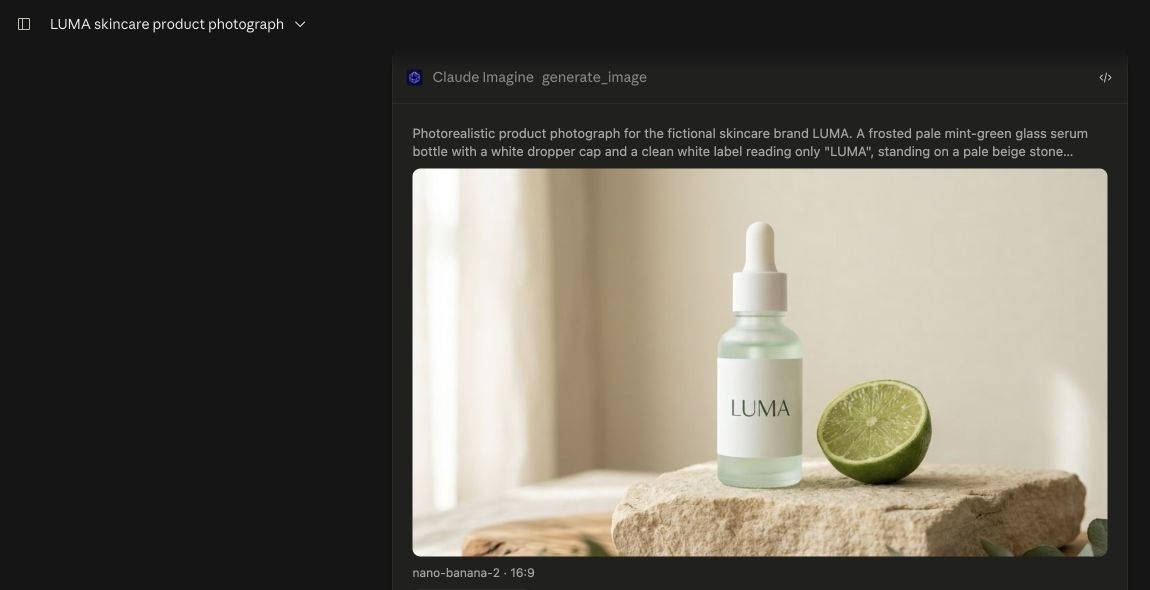
Actual claude.ai screenshot from September 8, cropped to exclude private account details. The image is AI-generated. This records the web client's display in that test, not a guarantee for every Claude client.
Check the bottle lettering and shape. Look at the space around the product, too: a picture that works on its own may need different framing beside your article title. Prompting for a brand name doesn't guarantee accurate text.
Keep the original-file link so you can open the image outside the chat and save it for your article.
If you receive a link but no preview, open the existing file first. A missing card doesn't necessarily mean generation failed. You can also ask:
Retrieve the result of the image generation we just ran.
Use its existing task ID and original-file link.
Don't create or edit an image, and don't spend generation credits.
Claude may still ask you to approve the retrieval tool. Read the request before allowing it. If the image already exists, you don't need to order a second generation just to see it.
Save the first result before trying changes. For a revision, name one specific adjustment, ask for a new quote, and treat the edit as a separate paid operation.
评论
发表评论